---
title: A Step-by-Step Guide to Shipping Your CREOATE Order
description: Follow our step-by-step guide to get this order (and every future order!) out smoothly. Shipping with CREOATE is quick, easy, and free — and you’ll soon find it second nature.
image: https://www.creoate.com/hubfs/how-to-ship-CREOATE-order.jpg
---

[![CREOATE-logo](https://www.creoate.com/hs-fs/hubfs/CREOATE-2022/CREOATE-logo.png?width=237&height=43&name=CREOATE-logo.png "CREOATE-logo")](https://www.creoate.com)

## [Blog](https://blog.creoate.com/)

[![Sign Up to shop](https://hubspot-no-cache-eu1-prod.s3.amazonaws.com/cta/default/25265714/7d705e6d-4ef2-4267-8ef0-fd84af378101.png)](https://hubspot-cta-redirect-eu1-prod.s3.amazonaws.com/cta/redirect/25265714/7d705e6d-4ef2-4267-8ef0-fd84af378101)

[![Subscribe](https://hubspot-no-cache-eu1-prod.s3.amazonaws.com/cta/default/25265714/78b06ab8-ce3c-4480-a57e-7ce82cfd35af.png)](https://hubspot-cta-redirect-eu1-prod.s3.amazonaws.com/cta/redirect/25265714/78b06ab8-ce3c-4480-a57e-7ce82cfd35af)

[CREOATE Seller Guides](https://www.creoate.com/blog/tag/creoate-seller-guides)

# A Step-by-Step Guide to Shipping Your CREOATE Order

###### By [**Hannah**](https://www.creoate.com/blog/author/hannah) ** Last updated: 21 July, 2026 **,  First published: 30 January, 2024

![how-to-ship-CREOATE-order](https://www.creoate.com/hs-fs/hubfs/how-to-ship-CREOATE-order.jpg?width=1200&height=800&name=how-to-ship-CREOATE-order.jpg)

Congratulations! You’ve landed a wholesale order through CREOATE. 

So, *what happens now?* 

Follow our step-by-step guide to get this order (and every future order!) out smoothly. If this guide looks long, it’s only because we’ve been sure to cover every base. But don’t worry; shipping with CREOATE is quick, easy, and free — and you’ll soon find it second nature. Let’s get started.


## 1. Check whether you can fulfil the entire order


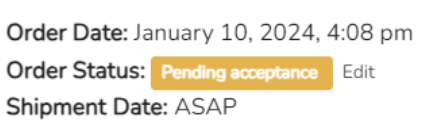
When you receive a new order, you’ll be notified by email. Head to your dashboard > Orders, and your latest order should appear at the top. It will have the yellow label ‘Pending acceptance’. 

Review the order and check whether you have all the items in stock. The sooner you do this step, the better.

💡 Good to know: Always double check the requested shipping date at the top of the order. 95% of the time, this will say ‘ASAP’, so you should get your order out as soon as possible. But occasionally, your buyer will request a future date, which may give you a chance to restock any items you don’t have. 


## 2. Accept the order as it is, or request a modification


If you’re able to fulfil the order in full: 

Change the status from ‘Pending acceptance’ to ‘Processing’ at the top of the order by clicking ‘Edit’ next to your order status. Don’t forget to hit ‘Update’ when you’re done. 
![Screenshot 2024-01-30 at 13.23.04](https://www.creoate.com/hs-fs/hubfs/Screenshot%202024-01-30%20at%2013.23.04.png?width=431&height=127&name=Screenshot%202024-01-30%20at%2013.23.04.png)

This will let your buyer (and us!) know that you’re on it, so be sure to update the status as soon as possible. 

If you’re not able to fulfil the order in full: 

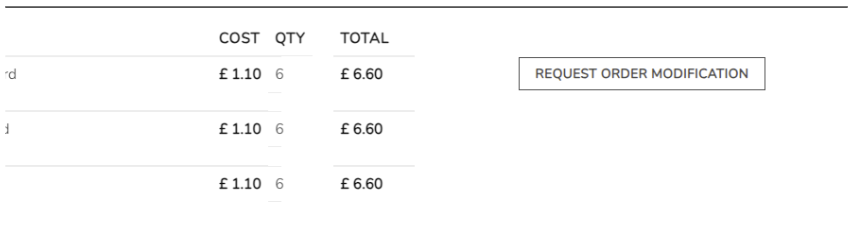
Don’t cancel the order. Instead, send a modification suggestion to your buyer by clicking the ‘Request Order Modification’ button within the order. 
![Screenshot 2024-01-30 at 13.23.13](https://www.creoate.com/hs-fs/hubfs/Screenshot%202024-01-30%20at%2013.23.13.png?width=851&height=240&name=Screenshot%202024-01-30%20at%2013.23.13.png)


Here, you can give up-to-date quantities against each item within the order, and submit this for approval.

We’ll email you as soon as possible to let you know whether your modification request has been accepted (most often they are, especially if the changes are minimal), or if your buyer needs to cancel the order.

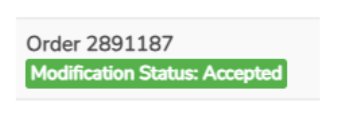
Once your order modification request has been accepted, this is how it the order will look within your dashboard: 
![Screenshot 2024-01-30 at 13.23.23](https://www.creoate.com/hs-fs/hubfs/Screenshot%202024-01-30%20at%2013.23.23.png?width=341&height=127&name=Screenshot%202024-01-30%20at%2013.23.23.png)

## 3. Pack your order

Now everything’s confirmed, it’s time to pack up your order! 

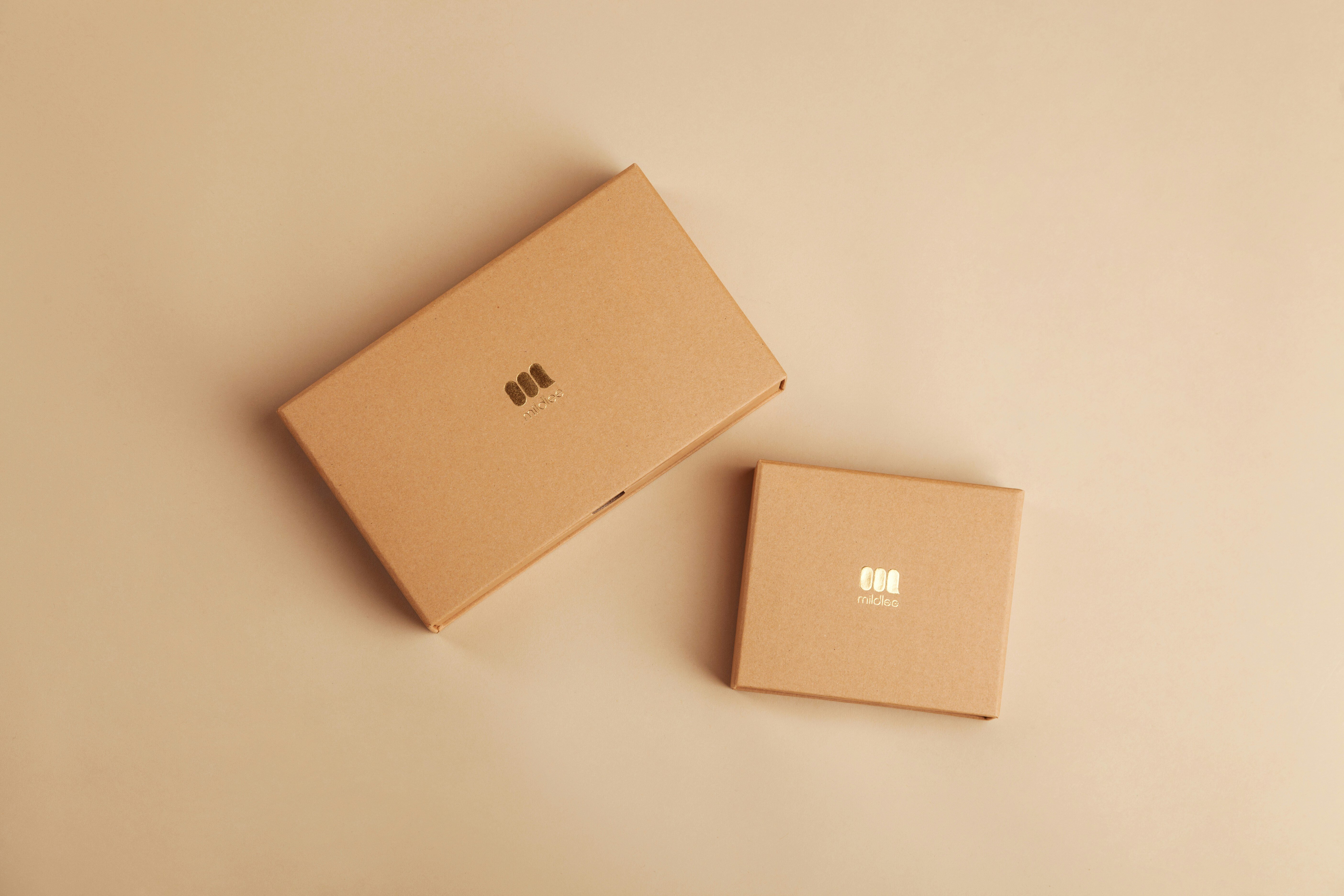
Your items may have many thousands of miles to travel, and your parcel needs to be sturdy enough to get them there in one piece.

Broken items are a disappointing experience for everyone involved, so take some time over this stage:

- Always use high quality corrugated cardboard boxes for parcels 
- For fragile or heavy items, we recommend double-wall or tri-wall constructions, as well as wrapping each item individually in protective layers
- Avoid reusing old boxes as they may have lost some of their rigidity
- Look out for the manufacturer stamp which tells you information about the construction type and strength of a box. Ask your box supplier for more information as required
- Under-filled boxes may collapse and over-filled boxes may burst, so choose a box that’s a snug fit for your order

💡Good to know: Very large boxes may also be subject to an [oversized shipment charge](https://helpcenter.creoate.com/heavyshipmentcharge), which is even more reason to pack your products snugly. 

❗ Important! Don’t seal your boxes yet — you’ll need to add some paperwork in them shortly. 

## 4. Request a shipping label

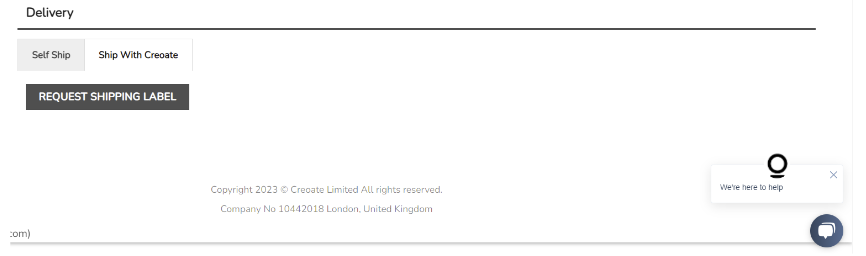
Once your order is ready, click ‘Request Shipping Label’ (within the ‘Ship with Creoate’ tab at the bottom of the order). Once your shipping label has been generated, you’ll get notified by email (typically within 15 minutes). Note that the notification email may come from our shipping partner ([no-reply@getfareye.com](mailto:no-reply@getfareye.com)). 


![Screenshot 2024-01-30 at 13.23.41](https://www.creoate.com/hs-fs/hubfs/Screenshot%202024-01-30%20at%2013.23.41.png?width=866&height=256&name=Screenshot%202024-01-30%20at%2013.23.41.png)

The option to ‘Print Shipping Label’ will then show at the bottom of order, and you’ll see a tracking number within your order dashboard. 

❗Want to ship your order yourself? Shipping through CREOATE is free and simple for sellers, but if you’d rather ship your packages yourself, click on the ‘Self Ship’ tab instead, and follow the instructions. You can find out more about self shipping in [this help article](https://helpcenter.creoate.com/can-i-use-my-shipping-courrier). 


## 5. Book a collection time

Next to the option to ‘Print Shipping Label’, you’ll see the option to book a collection. Find a time that works for you (the sooner the better!), and book it in. 


## 6. Print your shipping labels & any additional paperwork


🌍 If your order is being shipped outside of your own country (or your own state, if you’re based in the US), include the following: 

Visible on the outside of your package: 

- Your shipping label

Included in an envelope secured to the outside of the package:

- Your commercial invoice
- Any documentation necessary for your products to be sold in the country they’re being sent to

Within the package itself: 

- Another copy of your commercial invoice
- Your packing slip


🏠 If your order if being shipped within your own country (or state), include the following: 

Visible on the outside of your package: 

- Your shipping label

Within the itself package: 

- Your commercial invoice
- Your packing slip

![Screenshot 2024-01-23 at 14.26.29 copy](https://www.creoate.com/hs-fs/hubfs/Screenshot%202024-01-23%20at%2014.26.29%20copy.png?width=1607&height=259&name=Screenshot%202024-01-23%20at%2014.26.29%20copy.png)

You can find both your packing slips and your commercial invoices here within your Orders dashboard.


❗ Important! If your order is packed across multiple packages, be sure to include all the relevant documentation with each box of the order. 


## 7. Your order is collected

It’s collection day! Make sure your packages are carefully sealed, and send them on their way. Our shipping carrier will come to collect them from you at the chosen time. 

❗Missed your collection? Follow [these instructions](https://helpcenter.creoate.com/can-i-rebook-a-collection) to rebook it directly with the relevant shipping carrier. 


## 8. Check the order status has changed to fulfilled

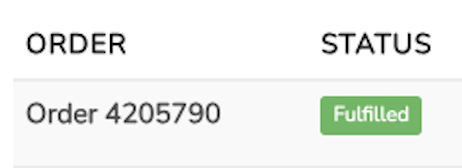
Once your order has been collected, go into the order within your dashboard and check the status has updated to ‘Fulfilled’, like so: 
 

 ![Screenshot 2024-01-23 at 15.18.36](https://www.creoate.com/hs-fs/hubfs/Screenshot%202024-01-23%20at%2015.18.36.png?width=462&height=168&name=Screenshot%202024-01-23%20at%2015.18.36.png)


In the majority of cases, this happens automatically. If you notice this status has not been updated, follow the steps in [this help article](https://helpcenter.creoate.com/mark-an-order-as-fulfilled).

💡 Good to know: Your 30-day payment window starts when your order is marked as fulfilled, because this is when we know your order has been successfully shipped. So it’s important to make sure this status has been updated to avoid any payout delays later on.  

## Congratulations! You’ve shipped your order

We hope this is the first of many wholesale orders you land through CREOATE. Head to [Sellers’ Corner](https://wholesale.creoate.com/sellers-corner) for more seller guides and tips for optimising your store, and making the most of your followers count.

![](https://www.creoate.com/hs-fs/hubfs/CREOATE-2022/CREOATE-logo.png?width=237&height=43&name=CREOATE-logo.png)

#### Stock your store with unique products from independent businesses today


![cta-sidebar-image](https://www.creoate.com/hs-fs/hubfs/CREOATE-2022/cta-sidebar-image.png?width=192&height=128&name=cta-sidebar-image.png)

[![Sign Up to shop](https://hubspot-no-cache-eu1-prod.s3.amazonaws.com/cta/default/25265714/7d705e6d-4ef2-4267-8ef0-fd84af378101.png)](https://hubspot-cta-redirect-eu1-prod.s3.amazonaws.com/cta/redirect/25265714/7d705e6d-4ef2-4267-8ef0-fd84af378101)

## You May Also Like

[![15 Order Confirmation Email Examples for Ecommerce Businesses](https://www.creoate.com/hubfs/Order-confirmation-email-examples-ecommerce.jpg) ](https://www.creoate.com/blog/order-confirmation-email-examples)

[Growing a Business](https://www.creoate.com/blog/tag/growing-a-business)

#### [15 Order Confirmation Email Examples for Ecommerce Businesses](https://www.creoate.com/blog/order-confirmation-email-examples)

[Read more >](https://www.creoate.com/blog/order-confirmation-email-examples)

[![11 Ongoing Checks & Changes to Make to Your CREOATE Store](https://www.creoate.com/hubfs/ongoing-updates-CREOATE-store.jpg) ](https://www.creoate.com/blog/ongoing-updates-creoate-store)

[Selling Wholesale](https://www.creoate.com/blog/tag/selling-wholesale) [CREOATE Seller Guides](https://www.creoate.com/blog/tag/creoate-seller-guides)

#### [11 Ongoing Checks & Changes to Make to Your CREOATE Store](https://www.creoate.com/blog/ongoing-updates-creoate-store)

[Read more >](https://www.creoate.com/blog/ongoing-updates-creoate-store)

[![Understanding Your Brand Statement & How Payments Work on CREOATE](https://www.creoate.com/hubfs/payments-on-CREOATE.jpg) ](https://www.creoate.com/blog/brand-statement-payments-creoate)

[CREOATE Seller Guides](https://www.creoate.com/blog/tag/creoate-seller-guides)

#### [Understanding Your Brand Statement & How Payments Work on CREOATE](https://www.creoate.com/blog/brand-statement-payments-creoate)

[Read more >](https://www.creoate.com/blog/brand-statement-payments-creoate)

You may also like

Recent

[![15 Order Confirmation Email Examples for Ecommerce Businesses](https://www.creoate.com/hubfs/Order-confirmation-email-examples-ecommerce.jpg)

#### 15 Order Confirmation Email Examples for Ecommerce Businesses

Read more > 

](https://www.creoate.com/blog/order-confirmation-email-examples)

[![11 Ongoing Checks & Changes to Make to Your CREOATE Store](https://www.creoate.com/hubfs/ongoing-updates-CREOATE-store.jpg)

#### 11 Ongoing Checks & Changes to Make to Your CREOATE Store

Read more > 

](https://www.creoate.com/blog/ongoing-updates-creoate-store)

[![Understanding Your Brand Statement & How Payments Work on CREOATE](https://www.creoate.com/hubfs/payments-on-CREOATE.jpg)

#### Understanding Your Brand Statement & How Payments Work on CREOATE

Read more > 

](https://www.creoate.com/blog/brand-statement-payments-creoate)

[![10 Trends For Autumn 2025](https://www.creoate.com/hubfs/toa-heftiba-DdF96qfUI60-unsplash.jpg)

#### 10 Trends For Autumn 2025

Read more > 

](https://www.creoate.com/blog/autumn-products-on-creoate)

[![What is Cost-Plus Pricing, and When Should You Use It?](https://www.creoate.com/hubfs/what-is-cost-plus-pricing.jpg)

#### What is Cost-Plus Pricing, and When Should You Use It?

Read more > 

](https://www.creoate.com/blog/what-is-cost-plus-pricing)

[![12 Things We’ve Learnt About Opening a Shop](https://www.creoate.com/hubfs/advice-for-opening-a-shop.jpg)

#### 12 Things We’ve Learnt About Opening a Shop

Read more > 

](https://www.creoate.com/blog/advice-for-opening-a-shop)

## Join us

#### Never miss a thing! Subscribe to our newsletter and stay up-to-date with CREOATE.

[![Subscribe](https://hubspot-no-cache-eu1-prod.s3.amazonaws.com/cta/default/25265714/78b06ab8-ce3c-4480-a57e-7ce82cfd35af.png)](https://hubspot-cta-redirect-eu1-prod.s3.amazonaws.com/cta/redirect/25265714/78b06ab8-ce3c-4480-a57e-7ce82cfd35af)

![No-Joining-Fee](https://www.creoate.com/hs-fs/hubfs/CREOATE-2022/No-Joining-Fee.png?width=42&height=42&name=No-Joining-Fee.png)

###### No Joining Fee

![Low-order-minimums](https://www.creoate.com/hs-fs/hubfs/CREOATE-2022/Low-order-minimums.png?width=36&height=36&name=Low-order-minimums.png)

###### Low order minimums

![Free-shipping](https://www.creoate.com/hs-fs/hubfs/CREOATE-2022/Free-shipping.png?width=41&height=26&name=Free-shipping.png)

###### Free shipping

[![CREOATE-logo](https://www.creoate.com/hs-fs/hubfs/CREOATE-2022/CREOATE-logo.png?width=237&height=43&name=CREOATE-logo.png "CREOATE-logo")](https://www.creoate.com/)

Discover and buy unique wholesale products online at Creoate. Shop wholesale homeware, home decor products, jewellery, fashion accessories, stationery, gifts, food, drinks, kids and baby products etc. from thousands of independent wholesale vendors.

<https://www.facebook.com/creoate?ref=footer&_ga=2.259835273.2006815913.1670238455-1179447920.1670238455> <https://www.linkedin.com/company/creoate?ref=footer&_ga=2.18222266.2006815913.1670238455-1179447920.1670238455> <https://www.instagram.com/creoate?ref=footer&_ga=2.18222266.2006815913.1670238455-1179447920.1670238455> <https://www.youtube.com/@creoate6896> <https://www.pinterest.co.uk/creoate/> [![tiktok_icon](https://www.creoate.com/hubfs/CREOATE-2022/tiktok_icon.svg) ](https://www.tiktok.com/discover/creoate)

- Help & Info 
    - [Help Center](https://helpcenter.creoate.com/?ref=footer&_ga=2.265626636.2006815913.1670238455-1179447920.1670238455)
    - [Delivery](https://www.creoate.com/delivery?ref=footer)
    - [Sell on CREOATE](https://www.creoate.com/join-as-a-brand?ref=footer)
    - [Payment Credit Terms](https://www.creoate.com/payment-credit-terms?ref=footer)
    - [Contact Us](https://helpcenter.creoate.com/?ref=footer&_ga=2.265626636.2006815913.1670238455-1179447920.1670238455)
- About CREOATE 
    - [About](https://www.creoate.com/about?ref=footer)
    - [Blog](https://www.creoate.com/blog?ref=footer)
    - [Join Our Team](https://creoate.breezy.hr/?ref=footer&_ga=2.268961266.2006815913.1670238455-1179447920.1670238455)
- Categories 
    - [Jewellery](https://www.creoate.com/product-category/jewellery?ref=footer)
    - [Gifts](https://www.creoate.com/product-category/gifts?ref=footer)
    - [Stationery](https://www.creoate.com/product-category/stationery?ref=footer)
    - [Beauty](https://www.creoate.com/product-category/beauty?ref=footer)
    - [Birthday Cards](https://www.creoate.com/product-category/birthday-cards?ref=footer)
    - [Mugs](https://www.creoate.com/product-category/mugs?ref=footer)
    - [Candles](https://www.creoate.com/product-category/candles?ref=footer)
    - [Discover](https://www.creoate.com/discover?ref=footer)
    - [Collections](https://www.creoate.com/collections?ref=footer)
- Policies 
    - [Terms of Service](https://www.creoate.com/terms-and-conditions?ref=footer)
    - [Privacy](https://www.creoate.com/privacy-policy?ref=footer)
    - [Returns](https://www.creoate.com/returns-policy?ref=footer)

Copyright 2026 © Creoate Limited All rights reserved. Company No 10442018 London, United Kingdom

```json
{
  "@context" : "https://schema.org/",
  "@type" : "WebPage",
  "name" : "A Step-by-Step Guide to Shipping Your CREOATE Order",
  "speakable" : {
    "@type" : "SpeakableSpecification",
    "xPath" : [ "/html/head/title", "/html/head/meta[@name='description']/@content" ]
  },
  "url" : "https://www.creoate.com/blog/how-to-ship-your-creoate-order"
}
```

```json
{
  "@context" : "https://schema.org",
  "@type" : "Organization",
  "alternateName" : "Creoate - Wholesale Marketplace for Independent Retailers and Brands",
  "logo" : "https://blog.creoate.com/hs-fs/hubfs/creoate-logo-long.png?width=225&name=creoate-logo-long.png",
  "name" : "Creoate",
  "sameAs" : [ "https://www.facebook.com/creoate/", "https://twitter.com/creoateuk", "https://www.instagram.com/creoate/", "https://www.linkedin.com/company/creoate/" ],
  "url" : "https://www.creoate.com/"
}
```

```json
{
  "@context" : "https://schema.org/",
  "@type" : "BreadcrumbList",
  "itemListElement" : [ {
    "@type" : "ListItem",
    "item" : "https://blog.creoate.com/",
    "name" : "Home",
    "position" : 1
  }, {
    "@type" : "ListItem",
    "item" : "https://www.creoate.com/blog/how-to-ship-your-creoate-order",
    "name" : "A Step-by-Step Guide to Shipping Your CREOATE Order",
    "position" : 2
  } ]
}
```

```json
{
  "@context" : "https://schema.org",
  "@type" : "BlogPosting",
  "author" : {
    "@type" : "Person",
    "name" : "Hannah"
  },
  "dateModified" : "POST MODIFIED DATE HERE - 2026-July-21",
  "datePublished" : "POST PUBLISHING DATE HERE - 2024-January-30",
  "description" : "",
  "headline" : "A Step-by-Step Guide to Shipping Your CREOATE Order",
  "image" : "https://25265714.fs1.hubspotusercontent-eu1.net/hubfs/25265714/how-to-ship-CREOATE-order.jpg",
  "mainEntityOfPage" : {
    "@id" : "https://blog.creoate.com/autumn-window-display-ideas",
    "@type" : "WebPage"
  }
}
```